Just a quick thing I made to see if I could still remember how to write Java (well, Processing really). Something strange happened when I was trying to draw some circles.
Tuesday, November 22, 2016

Monday, March 23, 2015
Interactive Scrim
Inspired by some work from @MartArtin, here is my interactive version.
It will be ordered if your mouse is on the left. Disordered if your mouse is toward the right.
- Click to toggle between grids or solids.
- Right-click to set a new start index for the noise function.
Here's a screenshot in case anything's broken and you can't see it.


Tuesday, January 13, 2015
Common Ground
Ten points are generated with a random location and shade. Each pixel on the screen is assigned a shade based on the interpolation of all known points (weighted by inverse distance). The known points move around.
Click to get a new one.
Click to get a new one.
Thursday, January 8, 2015
Vector Interpolation
Working on another project I had a requirement to estimate a vector at any given point based on known observations (wind speed and direction in this case). This is my test bed to explore the approach.
10 random vectors are generated. These are interpolated to estimate the vector at the mouse position.
10 random vectors are generated. These are interpolated to estimate the vector at the mouse position.
Thursday, February 20, 2014
ekkiNoDerm
Was doodling starfishy shapes the other day so thought I would have a go at doing the same in code. This is my first sketch using Perlin noise which is what gives the 'arms' their form.
Move the mouse to move through the noise, and vary the impact of the noise.
Mouse towards the top will give a starfish-like form. Mouse towards the bottom will look more like a flower.
Some screenshots below from my desktop version (seems to give more pleasing results - think the noise function might be implemented slightly differently in javascript for the web version).


Move the mouse to move through the noise, and vary the impact of the noise.
- Right-click to toggle symmetry on/off.
- Left-click to pick a new seed for the noise (only seems to work once for some reason - refresh the page if you want a new one to play with).
Mouse towards the top will give a starfish-like form. Mouse towards the bottom will look more like a flower.
Friday, December 27, 2013
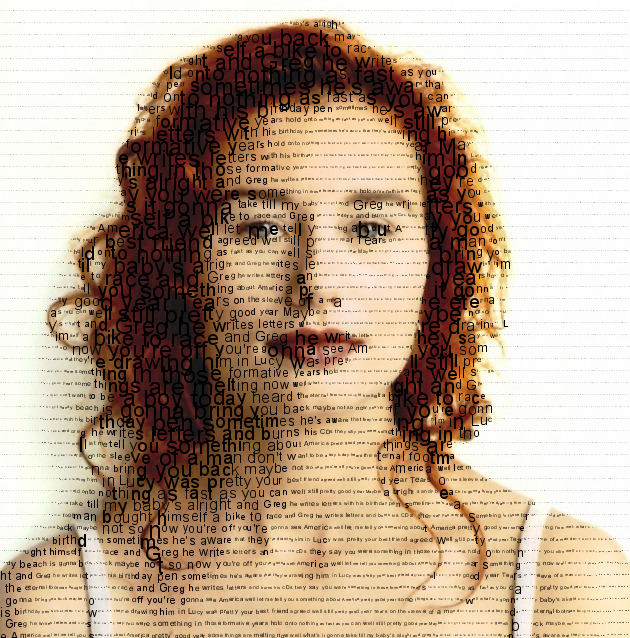
Pretty Good Year
Taking a break from turkey etc. to play around with text and images. Code robbed from http://generative-gestaltung.de/code with a few changes (mainly to enable source image as background with variable alpha channel). Brain hurts - back to the food and wine.


Saturday, August 31, 2013
Pathfinder Pictures
Here's a bit of work from around Easter time this year. I've been meaning to do more with it but not found time yet so might as well post what I've got.


Possible improvements:
The images are created in the following way:
- An agent wants to move from a random point on the screen, to another random point.
- An algorithm (Dijkstra or AStar) computes the shortest path between the points (where darker pixels of the target image are 'quicker' to move through).
- The path is marked by a very feint line.
- Repeat a few thousand times.
Here's a selection of outputs:
Possible improvements:
- Make it multi-threaded so runs quicker.
- Allow images to be enlarged to any size.
- Draw alternate RGB lines to build color images.
Saturday, July 27, 2013
Game - 100 Balls
I've had a go at writing my first ever game for an assessment as part of a Creative Programming course I'm taking on Coursera. Please give it a try. I've only really tested it in the Chrome browser. I suspect the sound won't work if you're using anything else.
Instructions:
Instructions:
- Fill up the screen with balls! Fill to the target to move up a level.
- Click and hold the mouse button to start adding a ball to the screen.
- Release the mouse button to add the ball.
- Avoid the red spiky things when adding a ball - they will pop it!
- Once a ball is added it cannot be popped.
Sunday, July 14, 2013
Bouncer
Here's a quick video of a sample sequencer thing I recently wrote for the Creative Programming for Digital Media and Mobile Apps course on the Coursera platform. It's based on the 'bounce' mode of the Yamaha Tenori-on.
First time using sound and threading so learned a lot. Not sure it's worth developing further any further though.
Monday, June 25, 2012
I turn to my computer...
...and see how my line drawing algorithm manages to reproduce an image of Kate Bush.
Here's a video of the whole process...
and a few images...


Here's a video of the whole process...
and a few images...
Tuesday, June 12, 2012
Who is it?
So there is this facebook competition to reproduce a Bjork album cover with the prize of tickets to see her at Roskilde.
I thought I would give my line drawing algorithm a go at this but I think it will be invalid because the rules forbid the use of 'digital tools'. This is a shame as:
- I created the digital tool.
- It's quite biophilia inspired (quasi-evolutionary process and the image sometimes seems to grow crystalline-like).
- I was looking forward to seeing her at Primavera but she had to cancel.
- I can't draw.
Oh well - here is the result anyway...

And here is a video of the image being grown...
Worth doing anyway. I'll catch her on the next tour.
Sunday, June 10, 2012
Angels of Monte Carlo
I love the work of this chap who layers packing tape onto glass to create images like this.

I thought I would have a go at writing a program to do the same. Initially tried to have a genetic algorithm placing virtual pieces of tape to try and match a target image. Results weren't great. Think I would need a massive population and an awful lot of computation to get anything half decent. I'll probably try again some time though.
So I tried a Monte Carlo approach. My code starts with a blank image and draws a random line (either black or white, random start and end, random thickness). If the line makes the image more like a given target image, it is retained other wise it is discarded and another random line is drawn (and so on).
I gave it a target image of the Angel of the North because I thought the clearly defined shape should be quite easy to find. Here's what it looked like after running for half an hour or so...
 and then after around two hours...

More detail in the second image but perhaps not as pleasingly 'arty'. Quite pleased with how they're looking though. Am going to try a few different target images and see what I get.

I thought I would have a go at writing a program to do the same. Initially tried to have a genetic algorithm placing virtual pieces of tape to try and match a target image. Results weren't great. Think I would need a massive population and an awful lot of computation to get anything half decent. I'll probably try again some time though.
So I tried a Monte Carlo approach. My code starts with a blank image and draws a random line (either black or white, random start and end, random thickness). If the line makes the image more like a given target image, it is retained other wise it is discarded and another random line is drawn (and so on).
I gave it a target image of the Angel of the North because I thought the clearly defined shape should be quite easy to find. Here's what it looked like after running for half an hour or so...
and then after around two hours...More detail in the second image but perhaps not as pleasingly 'arty'. Quite pleased with how they're looking though. Am going to try a few different target images and see what I get.
Monday, April 23, 2012
Damped Springy Drawing
Added some damping to my earlier springy drawing sketch.
Might take a while for the image to emerge as it can start very feint.
Click to get a new one!
Monday, March 19, 2012
Springy Drawing
Thought I would have a go at first generative artwork. Dusted off some old A-level physics about springs and came up with this.
A pen draws circles and starts with a random velocity. Pen is attached to a spring in the centre of the screen. The screen wraps around and you can get interesting effects when the pen moves off the edge.
Click to get a new one.
A pen draws circles and starts with a random velocity. Pen is attached to a spring in the centre of the screen. The screen wraps around and you can get interesting effects when the pen moves off the edge.
Click to get a new one.
Wednesday, February 22, 2012
Markov Chain Graph
This sketch aims to show the state transitions through a simple markov chain. I'm thinking of a component of a bridge (or whatever) which can have one of four condition grades. In each year, there is a probability of moving to the next worst condition grade.
Each blue plot represents a different run through the chain. The black line is the average state transition.
Move the mouse around to control the speed, and the persistence of each plot. I was interested to see if I could visualise the distribution around the mean - not sure it quite works.
Each blue plot represents a different run through the chain. The black line is the average state transition.
Move the mouse around to control the speed, and the persistence of each plot. I was interested to see if I could visualise the distribution around the mean - not sure it quite works.
Sunday, February 12, 2012
Hello World
So I've started this blog to share the work of myself (and others I guess) in the fields of generative art/data visualisation.
Been interested in this stuff for some time and finally got around to giving it a go.
I've chosen to learn the Processing language (mainly after seeing the amazing results produced by the Substrate artwork some years ago). So the goal is to produce beautiful work like that, but got to start somewhere.
I started here - my first Processing sketch. Click on the area below to draw some circles. Circles get bigger the further down the screen you are, and more transparent the further left you go. Right-click to clear the screen.
Not too exciting, but learned how to draw to the screen, and handle mouse interactions.
Subscribe to:
Posts (Atom)